Change the whole site without opening a code editor
Logo, colours, menus, footer columns, homepage blocks, per-page SEO and a switch for every module. The person running your alumni office should not need a developer to change the header.
Built on Laravel and Filament, so any developer who has met either finds their way around in minutes.
The settings that stop you filing a support ticket
The six things institutions change most in the first month, each a form field rather than a file edit.
Brand, in one screen
Upload the logo, set the palette to the institution's identity, and the whole site follows: header, buttons, links and email templates.
Menus and footer
Add, rename, reorder and remove items in the main menu and footer columns. Point them at your pages or anywhere else, including the main school site.
Homepage blocks
Choose which blocks appear and in what order: latest news, upcoming events, notable alumni, the giving call to action.
Per-page SEO fields
Title and description for every page and post, editable by whoever wrote it. No plugin, no separate tool.
News and blogModule on and off switches
Not running mentoring this year? Turn it off and it leaves the menus, the admin panel and the site. Turn it back on later, nothing lost.
Mentoring moduleMaintenance mode and consent
Put the site behind a holding page while you set it up, and switch on cookie consent before you go live, not three months after.
The same software, wearing your institution's colours
This install is configured as a college alumni association. The logo, palette, menu, homepage blocks and the wording of every section came out of the admin panel, not a template file.
None of it required a developer. It is an afternoon's work with a logo file and a hex code from the brand guidelines.
See more screenshots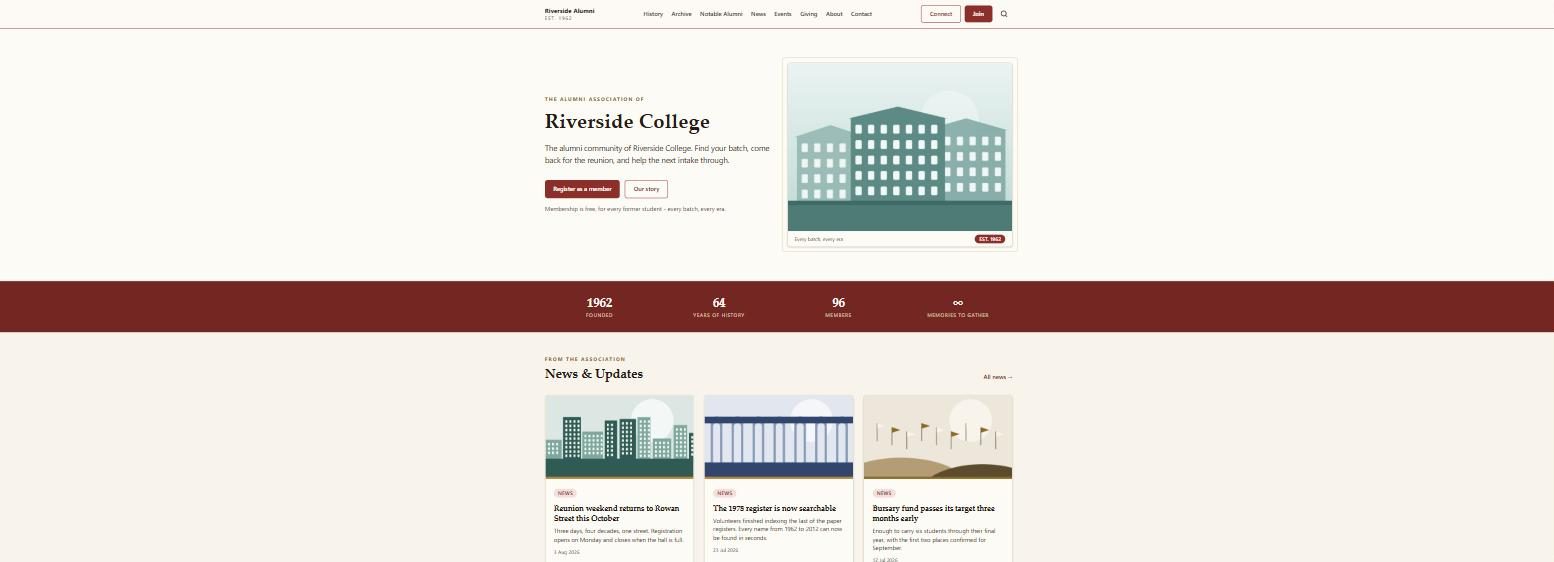
Install to launched, in one sitting
The order matters. This sequence means nobody sees a half-built alumni site.
Turn maintenance mode on first
Before anything else. Alumni do not need to watch you choose a shade of blue, and a site that looked unfinished on a first visit rarely gets a second one.
Brand, menus, modules
Logo, colours, then the menu. Then switch off every module you are not ready to run. Four working sections beat eleven, three of which are empty.
Write four pages, then launch
Homepage wording, about, contact and one news post. Fill in the SEO title and description on each, take maintenance mode off, and tell one class group before everybody.
What a settings panel can and cannot do
This is where website builder claims usually get vague, so here is the specific shape of it.
The everyday changes are genuinely codeless
Renaming a menu item, changing the brand colour after a rebrand, hiding the job board, rewriting the homepage introduction, adding a committee member to the office bearers page, correcting an SEO description: each is a form, a save and a refresh. That is most of a year's requests, and the difference between a site that stays current and one that freezes the day the developer's invoice was paid.
The honest limitation
AlumDeck is a settings panel, not a drag and drop page builder. You choose which blocks appear on the homepage and their order; you do not draw arbitrary layouts, drop a grid halfway down a page, or restyle one button. There is a single design, your logo and colours go into it, and there is no theme marketplace.
If your identity has to be matched exactly, budget a developer day. The source ships unencoded as an ordinary Laravel application, so a developer can change anything, but that is a code job and we will not pretend otherwise. For most schools the constraint is a feature: nobody can accidentally make one page look different.
Who can be given a login
- Unlimited admin accounts at no extra cost, so a class rep can clear the verification queue for their own year.
- A committee member can publish news without being handed the settings screens.
- IT can hold the server credentials while the alumni office holds the content.
Admin panel questions
Can we match our exact brand colours?
Yes for colours and the logo, which is most of what a brand guideline is made of. Set the palette in settings and the site follows it throughout.
Exact typography and bespoke layouts are a template job. Everything is editable because you hold the source, but that part is code.
What if we do not want half the modules?
Switch them off. A toggle per module removes it from the public site, the menus and the admin panel.
Most institutions launch with the directory, news and events, then turn on giving and mentoring in year two.
Is the admin panel included, or an upgrade?
Included, with every module, unlimited admins and a year of updates and support, for one payment of $49 per installation. There is no higher tier to upgrade to. The pricing page says where the licence stops.
Do updates overwrite our settings?
No. Settings, content and uploads live in your database and storage folder, not in the code, so an update replaces application files and leaves your site as it was.
Take a backup first anyway. It is your server, so the backup is your responsibility.
Run the alumni site without booking developer time
Branding, menus, homepage blocks, SEO fields and module switches are in the same $49 licence as every module they control.
Evaluating it for a client? Email hello@alumdeck.com and ask anything technical.